top of page


Time Reporter
Overview
A mobile attendance app focused on clock-in/out, enabling employees to manage attendance and reports.
The Problem
The existing app supported only basic clock-in/out actions, requiring employees to use a desktop system to complete missing entries or submit reports.
Role
Product Designer (Sole)
The Solution
Redesign the app to improve user experience and enable mobile attendance management.
Challenges and Constraints
The app needed to maintain a fast and simple clock-in/out experience while expanding its functionality to support additional attendance actions.
Key challenges included:
-
Preserving a quick and effortless clock-in/out interaction.
-
Introducing reporting capabilities without disrupting the main flow.
-
Improving the visual design of an outdated and inconsistent interface.
-
Balancing simplicity with additional features.
Research
The research focused on understanding how employees use the app and identifying gaps in managing attendance records and reports. This included:
-
Process Review: Examined how employees complete missing attendance reports via desktop systems, highlighting inefficiencies.
-
User Needs Identification: Identified the need for a mobile-first solution that allows employees to manage attendance and reporting in one place.
Optimized User Flow and Design
-
Modernized Visual Design: Redesigned the interface to create a more modern and visually appealing experience.
-
Structured Navigation: Organized the app into distinct sections for attendance, reports, and team visibility.
-
Reporting Management: Enabled users to complete missing entries and manage reports directly from the app.
Clock In
Allows employees to start their work session with a single action.
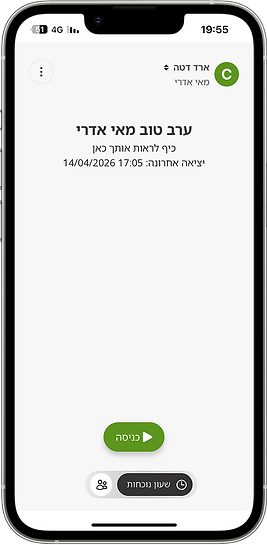

Before
-
Information and content overload
-
Lack of structure and hierarchy
.png)

After
-
Removed irrelevant content
-
Clear and well-structured layout
Clock Out
Allows employees to end their work session and record their attendance.

Before
-
Used red for a non-destructive action

After
-
Changed to a more suitable color
Active Employees
A screen that provides real-time visibility of employees currently working and available.

Before
-
Limited use of color
-
No distinction between teams
-
Poor content hierarchy
.png)
.png)
After
-
Added color to improve visual clarity
-
Introduced tabs to separate teams and employees
-
Improved content hierarchy
Attendance
A newly designed reporting screen that was not part of the original app.
It provides a clear overview of monthly attendance reports, and users can submit attendance directly from this screen.
-
Attendance Update: Complete Missing Clock-Out
For a missing clock-out time, users can tap Missing Entry to update it. The time is prefilled based on the employee’s standard schedule, but can be adjusted.

Attendance Screen

Complete Clock-Out Time
.png)
Pending Manager Approval
-
Attendance Update: Work Day
In case of a missing full-day entry, when selecting Missing Entry, the default is set to “Workday,” and the hours are automatically filled based on the employee’s standard schedule.
.png)
Attendance Update

Update Clock-In Time

Pending Manager Approval
-
Attendance Update: Sick Leave
For Sick Leave, users can tap Missing Entry to report one or multiple sick days. Only undreported dates are selectable, and a doctor’s certificate is required.

Attendance Update

Add Note

Attendance Type

Pending Manager Approval

Select Dates

Sick Leave Entry
Interactive Filters
Attendance status cards act as interactive filters, allowing users to quickly view reports based on attendance status with a single tap.


Profile
A newly designed profile screen for the app, allowing users to manage settings and log out.
Before
-
Logout from home screen
-
Company switch on home screen

After
-
Logout moved to profile
-
Company managed in profile
.png)
Currently in Development
The product is currently in development, turning the final designs into a working experience.
IN DEVELOPMENT

.png)
.png)
bottom of page